Model OPC UA FX by saying what each node is
The fx: vocabulary of OPC UA Modeler
An OPC UA FX model repeats the same structure many times. Every functional entity has its InputData, OutputData and ConfigurationData folders. Every automation component has its FunctionalEntities and Assets folders. Every control group needs references to the variables it restricts. You write that structure by hand, for every type, and you check it by hand.
OPC UA Modeler now writes it for you. Its fx: vocabulary lets you say what a node is in OPC UA FX (Field eXchange). The modeler then writes the folders and references that the specification requires.
What OPC UA Modeler is
OPC UA Modeler turns a YAML file into a NodeSet2 file. NodeSet2 is the XML format that the OPC Foundation defines to exchange an OPC UA information model (the types, objects and variables that a server exposes). You write the model in YAML, and the modeler compiles it, checks it and writes the XML. It runs as a command-line interface (CLI), as a Visual Studio Code extension and in an online editor.
One sample, written twice
OPC 10000-81, the OPC UA FX information model, ends with informative samples [1]. The simplest one is a temperature monitor. It publishes a Temperature, and it lets its owner choose an EngineeringUnit. A control group, MonitorControl, protects the unit: while the temperature is in use, only the owner of the group can change it.
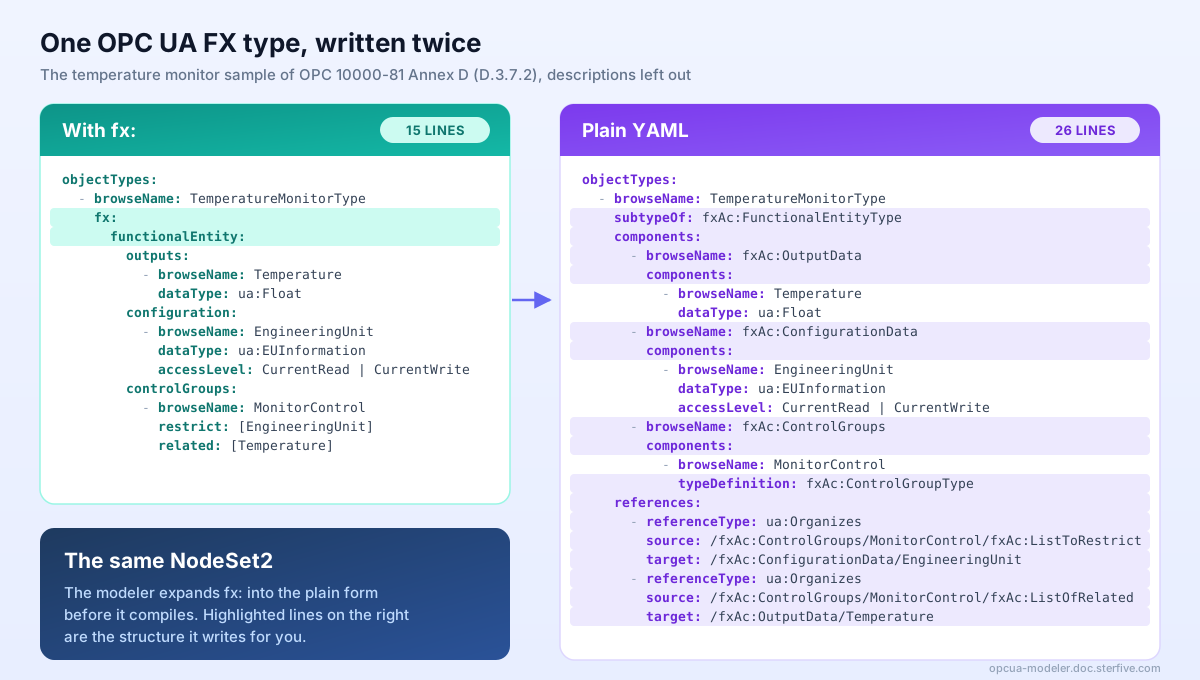
With the fx: vocabulary, you say exactly that:
objectTypes:
  - browseName: TemperatureMonitorType
    fx:
      functionalEntity:
        outputs:
          - browseName: Temperature
            dataType: ua:Float
        configuration:
          - browseName: EngineeringUnit
            dataType: ua:EUInformation
            accessLevel: CurrentRead | CurrentWrite
        controlGroups:
          - browseName: MonitorControl
            restrict: [EngineeringUnit]
            related: [Temperature]
The block says that TemperatureMonitorType is a functional entity. Temperature is an output. EngineeringUnit is configuration. MonitorControl restricts the unit and relates to the temperature.
The modeler expands the block into plain YAML before it compiles. Here is that plain form:
objectTypes:
  - browseName: TemperatureMonitorType
    subtypeOf: fxAc:FunctionalEntityType
    components:
      - browseName: fxAc:OutputData
        components:
          - browseName: Temperature
            dataType: ua:Float
      - browseName: fxAc:ConfigurationData
        components:
          - browseName: EngineeringUnit
            dataType: ua:EUInformation
            accessLevel: CurrentRead | CurrentWrite
      - browseName: fxAc:ControlGroups
        components:
          - browseName: MonitorControl
            typeDefinition: fxAc:ControlGroupType
    references:
      - referenceType: ua:Organizes
        source: /fxAc:ControlGroups/MonitorControl/fxAc:ListToRestrict
        target: /fxAc:ConfigurationData/EngineeringUnit
      - referenceType: ua:Organizes
        source: /fxAc:ControlGroups/MonitorControl/fxAc:ListOfRelated
        target: /fxAc:OutputData/Temperature
The plain form is correct, and you can still write it. But you must know the folder names, the base type, the type of a control group and the paths of its lists. With fx:, the modeler knows them.
Shorter, and the same result
The samples page of the documentation rebuilds the four samples of OPC 10000-81 Annex D. It shows each one in both forms [2]. We compiled each form and measured the NodeSet2 file it produces:
| Sample | With fx: | Plain YAML | NodeSet2 XML | Nodes |
|---|---|---|---|---|
| Temperature monitor | 21 lines | 30 lines | 582 lines | 39 |
| Analogue input modules | 45 lines | 53 lines | 211 lines | 21 |
| Automated guided vehicle (AGV) | 40 lines | 85 lines | 1,138 lines | 79 |
| Raspberry Pi automation component | 301 lines | 335 lines | 5,609 lines | 400 |
Read the last two columns first. The 21 lines of the temperature monitor become a NodeSet2 file of 582 lines, with 39 nodes and 109 references. The modeler writes all of it: the folders, the members that the FX types make mandatory, the type definitions and every reference between them. That is the file an OPC UA server loads, and nobody has to write it or read it by hand.
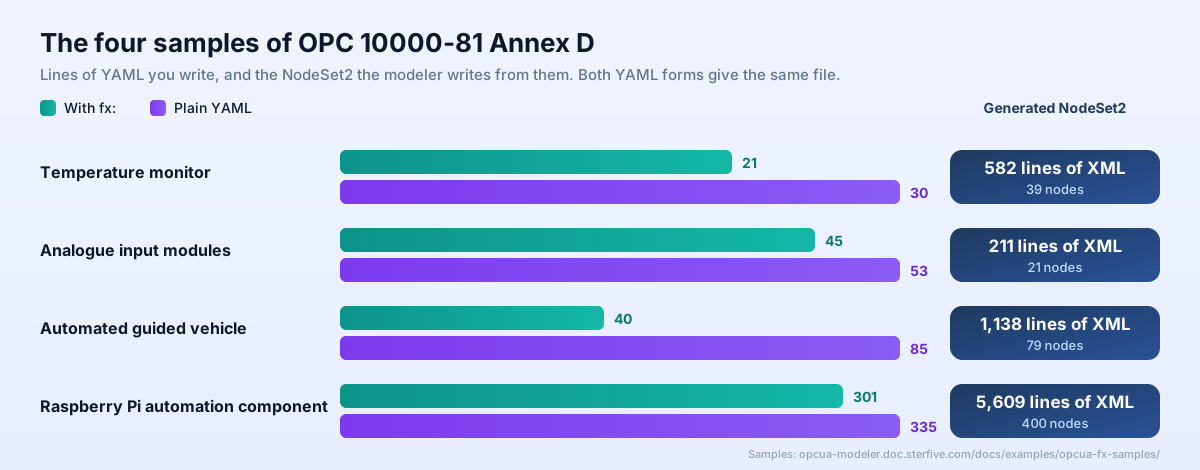
The line counts include the descriptions of each node. The gain is largest where the structure is deepest. The AGV sample has two control groups, and its fx: form is less than half as long as its plain form.
Each fx: form compiles to the same NodeSet2 as its plain form, byte for byte. The documentation build compares the two XML files for every sample, on every pipeline. If one form changes and the other does not, the build fails.
Plain YAML underneath, and nothing to get wrong
An fx: block is a shorthand, not a new model [3]. The modeler expands it into plain YAML, and then compiles that plain YAML like any other model.
- Nothing is hidden. The result is the NodeSet2 you would get from the plain YAML. You can mix both forms in one file, and add any plain key beside an
fx:block. - The structure cannot be wrong. In the plain form, you type
fxAc:ListToRestrict,fxAc:ConfigurationDataand the base type yourself. One wrong folder name or one missing reference gives a model that compiles but does not conform to OPC UA FX. Withfx:, you never type these names. The modeler writes them from the specification, the same way every time. - Your own names are checked. The names you do write are checked too. A name in
restrictorrelatedmust be an input, output, configuration variable or method of the entity. If it names nothing, you get an error before anything compiles. - Reverse gives the vocabulary back. When you reverse an existing NodeSet2 file that uses OPC UA FX, the modeler writes the
fx:form wherever it says the same thing. It keeps each rewrite only after it checks that the rewrite compiles to the same NodeSet2. Anything the vocabulary cannot say stays in plain YAML beside the block. - The specification is public. Addendum FX of the OPC UA YAML specification defines the block, its expansion and its rules [4].
NodeIds stay stable
A client that stores a NodeId (the identifier of a node in a server) breaks if the next release of the model gives that node another number. OPC UA Modeler prevents this with its symbols file [7].
- The tool allocates the NodeIds. You never write one. The generator gives each new node a NodeId and records it in the symbols file, keyed by the node's browse path.
- Every later build reuses them. The generator reads the symbols file back on the next run. Add a variable next month and it gets a new number; every node that already existed keeps its own.
- The vocabulary changes nothing here. An
fx:block produces the same nodes, at the same browse paths, as its plain form. So a model keeps its NodeIds when you rewrite it withfx:, and when you go back to plain YAML. - The tool can check it for you.
opcua-modeler doctorreports a symbols table that is out of date or that gives one NodeId to two nodes.generate --frozenfails if a node has no NodeId in the table yet, which makes it a check for your release pipeline [8].
Checks that point at your line
The vocabulary reports its own mistakes before it compiles. An unknown key, a name that names nothing or an author version in the wrong format each gets an error on the fx: block [3].
After the expansion, the FX conformance rules run on every model that imports OPC UA FX. Each finding points at the YAML line of the node, not at a line of generated XML [5].
The editor also completes the links. hostedBy names the asset that hosts a functional entity, and executingOn names the environment that runs it. When you type either one, the editor offers the assets of your document [5].
Devices too: the di: vocabulary
OPC UA for Devices (OPC 10000-100, often called DI) has the same pattern. A device type keeps its process values in a ParameterSet, its methods in a MethodSet, and arranges both into functional groups such as Configuration or Maintenance.
A di: block declares parameters, methods, functional groups, identification, nameplate and lock on a type. On an instance, it sets nameplate values and places the device in the DeviceSet. Eight DI rules check the result [6] [5].
Try it
The fx: and di: vocabularies are in OPC UA Modeler 2.24 and later, in the CLI, the Visual Studio Code extension and the online editor. To update the CLI:
npm install -g @sterfive/opcua-modeler@latest
Then start with these pages:
- The OPC UA FX vocabulary: the guide, with one example per kind of block.
- OPC UA FX samples: the four samples of OPC 10000-81 Annex D, in both forms.
- The OPC UA DI vocabulary: the same idea for device types.
If you model OPC UA FX components and the vocabulary does not yet say something you need, we would like to hear about it. Reach out through the Sterfive contact page.
References
[1] OPC Foundation. OPC 10000-81: OPC UA FX, Connecting Devices and Information Model. OPC Foundation reference site. https://reference.opcfoundation.org/
[2] Sterfive. OPC UA FX samples from OPC 10000-81 Annex D. OPC UA Modeler documentation, 2026. https://opcua-modeler.doc.sterfive.com/docs/examples/opcua-fx-samples/
[3] Sterfive. The OPC UA FX vocabulary. OPC UA Modeler documentation, 2026. https://opcua-modeler.doc.sterfive.com/docs/examples/opcua-fx-vocabulary/
[4] Sterfive. OPC UA YAML DSL specification, Addendum FX. OPC UA Modeler documentation, 2026. https://opcua-modeler.doc.sterfive.com/specification/addendum-fx.html
[5] Sterfive. OPC UA Modeler release notes, version 2.24. OPC UA Modeler documentation, 2026. https://opcua-modeler.doc.sterfive.com/docs/release-notes
[6] Sterfive. The OPC UA DI vocabulary. OPC UA Modeler documentation, 2026. https://opcua-modeler.doc.sterfive.com/docs/examples/opcua-di-vocabulary/
[7] Sterfive. Create a NodeSet2.xml file, step 4: keep the NodeIds stable. OPC UA Modeler documentation, 2026. https://opcua-modeler.doc.sterfive.com/docs/guides/create-nodeset2-xml/
[8] Sterfive. Diagnostics reference, doctor: file and ledger health. OPC UA Modeler documentation, 2026. https://opcua-modeler.doc.sterfive.com/docs/reference/diagnostics/